Mastering Custom Signet Ring Design in Rhino 3D: From Classic to Championship in Jewelry CAD
Mastering Custom Signet Ring Design in Rhino 3D: From Classic to Championship in Jewelry CAD
From Classic to Championship Signet Ring Jewelry CAD Course
This course teaches jewelry designers and CAD professionals how to design detailed and production-ready signet rings using Rhino 3D, with workflows that include surface modeling, stone setting, engraving, and custom form development.
Who This Course Is For
This course is for:
Jewelry designers and CAD professionals who want specialized training in signet ring modeling
Makers and artisans transitioning from basic CAD to jewelry-specific workflows
Students and professionals building skills for production-ready 3D modeling
Learners interested in form variation, engraving, and stone setting for jewelry applications
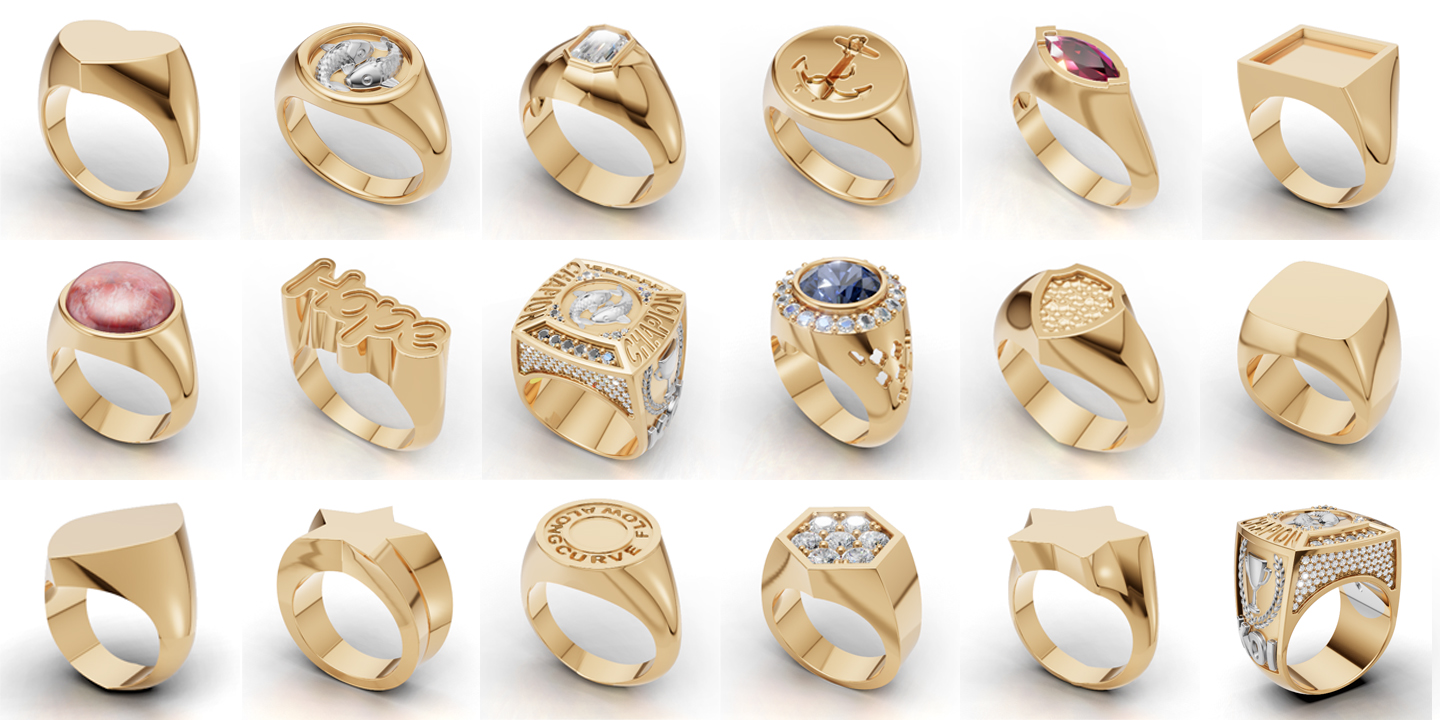
Model a variety of signet ring shapes in Rhino 3D, including round, oval, cushion, heart, and angular forms
Apply stone setting, texturing, and engraving techniques to signet rings
Perform advanced surface editing, hollowing, and SubD modeling for complex surfaces
Design custom artwork, logos, and low-relief details integrated into signet rings
Explore workflows for professional output, including file preparation and presentation
Prerequisite(s) and requirements

Basic knowledge of Rhino 3D is required. Students should be comfortable with basic navigation and modeling tools before starting this course.
All students must have a computer with Rhino installed before class. The Rhino trial version can be downloaded for free at https://www.rhino3d.com/download for 90 days. The Window system and three-button mouse is preferred.
For more hardware requirements please check at https://www.rhino3d.com/support
If you prefer to use Mac, please check out Rhino for Mac information at https://www.rhino3d.com/mac
1.1 Welcome and How to Use This Course
FREE PREVIEW1.2 Essential Surface Tools for Signet Ring Creation
1.3 Exercise Folder Download Files
1.4 Rhino File Version Converter: Convert Files Across Rhino Versions with Convert App
2.1 Creating a Box Signet Ring
FREE PREVIEW2.2 Classic Signet Ring Variations (Round, Oval, Cushion)
2.3 Designing a Heart-Shaped Signet Ringing
2.4 Rectangular Signet Ring Design
2.5 Angular Signet Ring Design
2.6 Faceted Angular Star Signet Ring
2.7 Hexagonal Signet Ring with Pavé Setting
2.8 Bezel-Set Emerald Cut Signet Ring
2.9 Rebuilding the Bottom of the Ring Shank
2.10 Engraving and Embossing Basics
2.11 text on ring- deform text on the side of ring
3.1 Hollow vs. Solid Ring Structures
3.2 Integrating Round Cabochon Stone Settings
3.3 Surface Editing Techniques on the Ring Shank
3.4 Marquise Faceted Stone Bezel Setting
3.5 Customizing Side Patterns on a Signet Ring
3.6 Tracing and Vectorizing Images for Custom Patterns
3.7 Bridge Design and Structural Fitting
3.8 Hammer-Textured Shield Signet Ring
3.9 Typography-Based Signet Rings
3.10 Bead Setting with Pattern – Part 1
3.11 Bead Setting with Pattern – Part 2
3.12 Understanding Raised Relief in Perspective View
3.13 Creating Low-Relief Koi Fish Details – Part 1
3.14 Creating Low-Relief Koi Fish Details – Part 2
3.15 Designing Signet Rings as Wax Seal Rings
4.1 Creating the Championship Ring Shank
4.2 Recessed Areas for Bead Setting and EngravedEmbossed Text
4.3 Raised Relief Design with Bead Setting
4.4 Applying Text and Logo to the Ring Side
4.5 Sculpting Low Relief Forms on the Ring Side
4.6 Creating Puffy Text for Championship Rings
4.7 Designing a Hollow Bridge and Ring Gallery
4.8 Pavé Setting – Part 1
4.9 Pavé Setting – Part 2
5.1 Setting Up Files for Rendering
5.2 Rendering techniques- Applying Materials, Environment and Background
6.0 SubD Signet Ring Practice
6.1 What is Rhino SubD
6.2 Create Classic Signet Ring with Rhino SubD


$295.00
$395.00
$495.00
$1,200.00